A eufy solar camera can work very well in a garden, but only if the space suits how the camera charges, connects, and sees movement. Before choosing one, look at your garden in practical terms: where sunlight reaches in winter, where people actually enter, how far the camera will sit from your Wi-Fi, and how much footage you want to keep. The right setup gives you dependable coverage with less maintenance. The wrong setup can leave you with weak charging, patchy connection, or a view that misses the areas you care about most.
Does Your Garden Have a Suitable Solar Charging Spot?
Check Sunlight Beyond the Summer Months
A solar camera needs consistent daylight, not just a bright position in July. Check the garden during shorter winter days, when fences, sheds, trees, and your house cast longer shadows across walls and posts. A spot that looks ideal in summer may deliver far less useful charging once the sun sits lower. Walk outside in the morning and afternoon to see how long direct light actually reaches the mounting area. If your garden is heavily shaded for much of the day, solar charging will be less reliable. Open-facing boundaries, clear fence lines, and unobstructed walls usually provide the strongest results for year-round performance and fewer manual charging interruptions over time.
Position the Panel Without Compromising the Camera View
Solar placement should support charging without forcing a poor camera angle. If the best sunny spot points away from the gate, patio, or shed door you want to monitor, treat that as a warning sign. You need both a useful view and access to daylight. When planning the mount, check whether the panel can face the sun while the camera still captures the approach path, not just a fence or patch of lawn. Avoid placing it so high that faces become hard to identify, or so low that plants and furniture block the lens. A practical garden setup balances exposure to sun with a clear line of sight to the areas where movement and access matter most.
Can the eufyCam S4 Cover Your Garden’s Main Access Points?
Match the Fixed View to Gates and Garden Buildings
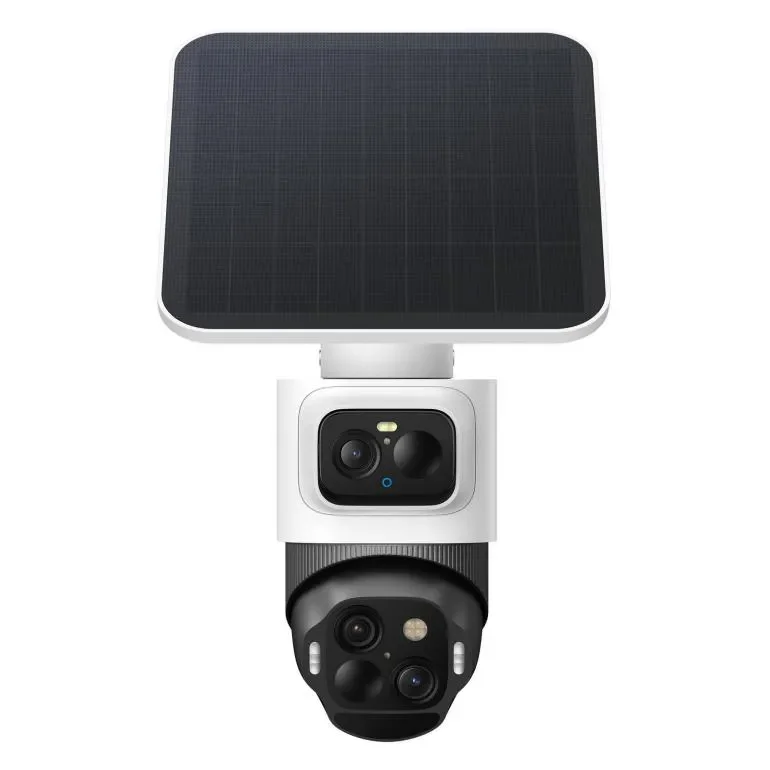
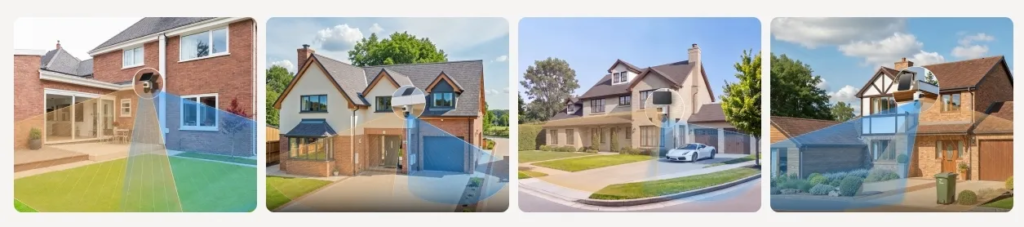
Garden security works best when the fixed camera view naturally covers the places people use to enter or move between spaces. The eufyCam S4 combines an upper 4K wide-angle camera with a 130° fixed view and a lower 2K dual-lens Pan-Tilt-Zoom camera that rotates for 360° coverage. That setup suits gardens with a main gate, side path, patio entrance, or detached building such as a shed or garden office. Use the fixed upper view for the key access point you always want visible, then rely on the rotating lower lens to follow movement elsewhere. If your garden layout has one clear entry route plus wider open space, this camera design is especially well matched.
Assess Tracking for Movement Across Open Areas
Tracking matters most in gardens where movement does not stay in one narrow corridor. If someone enters through a side gate and then crosses a lawn, path, or patio, you want the camera to maintain useful coverage after the first detection. A rotating view is especially helpful in wider spaces where activity can shift quickly from one zone to another. Think about whether people move diagonally across the garden, pass behind seating areas, or head toward bins, storage, or back doors. In a compact courtyard, advanced movement coverage may be less important. In a broad or irregular garden, it can make the difference between spotting entry and actually following what happens next.
Will the Camera Fit Your Connection and Recording Needs?
Check Connectivity Before Choosing a Mounting Spot
Before fixing any camera outdoors, test your Wi-Fi where you plan to install it. Garden walls, brick extensions, metal sheds, and distance from the router can all weaken signal strength. A camera may power well from solar charging yet still perform poorly if connection drops in the far corner of the garden. Stand in the exact mounting area with your phone and check whether the signal remains stable, not just present. Repeat the test at different times if your network gets crowded in the evening. Also think about whether the best view of the gate or patio is actually too far from the house. Good placement starts with balancing visibility, charging potential, and dependable connection.
Decide Whether Standalone Storage Meets Your Needs
Recording needs are just as important as placement. The eufyCam S4 supports standalone operation and includes 32GB of built-in storage, with support for up to 256GB through a separately purchased microSD card. For many gardens, that will be enough if you mainly want to review motion events around a gate, patio, or shed. It is a practical fit when you prefer local storage and want a simpler setup without relying on extra hardware. Think about how often your garden sees activity, how long you want to keep clips, and whether seasonal movement from pets, visitors, or deliveries will create more recordings. Compare Anker eufy security deals, including storage expansion costs.
Conclusion
A eufy solar camera is right for your garden when the space gives it three essentials: reliable year-round light, a clear view of the access points that matter, and a stable connection back to your home network. The eufyCam S4 makes most sense in gardens with one main entry area plus wider space that benefits from broader visual coverage and tracking. It also suits buyers who want local recording without a complicated setup. If your garden is deeply shaded, far from Wi-Fi, or difficult to view from one practical mounting position, you should address those limits first before expecting strong everyday performance.